> ## Documentation Index
> Fetch the complete documentation index at: https://openrouter.ai/docs/llms.txt
> Use this file to discover all available pages before exploring further.
# OpenTelemetry Collector
> Send traces to any OpenTelemetry-compatible backend
[OpenTelemetry](https://opentelemetry.io/) is an open-source observability framework for collecting, processing, and exporting telemetry data. OpenRouter can send traces to any backend that supports the OpenTelemetry Protocol (OTLP), including Axiom, Jaeger, Grafana Tempo, and self-hosted collectors.
## Step 1: Get your OTLP endpoint and credentials
Set up your OpenTelemetry-compatible backend and obtain the OTLP traces endpoint URL along with any required authentication headers.
For Axiom:
1. Create an Axiom account and dataset
2. Go to **Settings > API Tokens** and create a new token
3. Your endpoint is `https://api.axiom.co/v1/traces`
4. You'll need headers: `Authorization: Bearer xaat-xxx` and `X-Axiom-Dataset: your-dataset`
For self-hosted collectors:
1. Deploy an OpenTelemetry Collector with an OTLP receiver
2. Configure the receiver to listen on a publicly accessible endpoint
3. Note the endpoint URL (typically ending in `/v1/traces`)
## Step 2: Enable Broadcast in OpenRouter
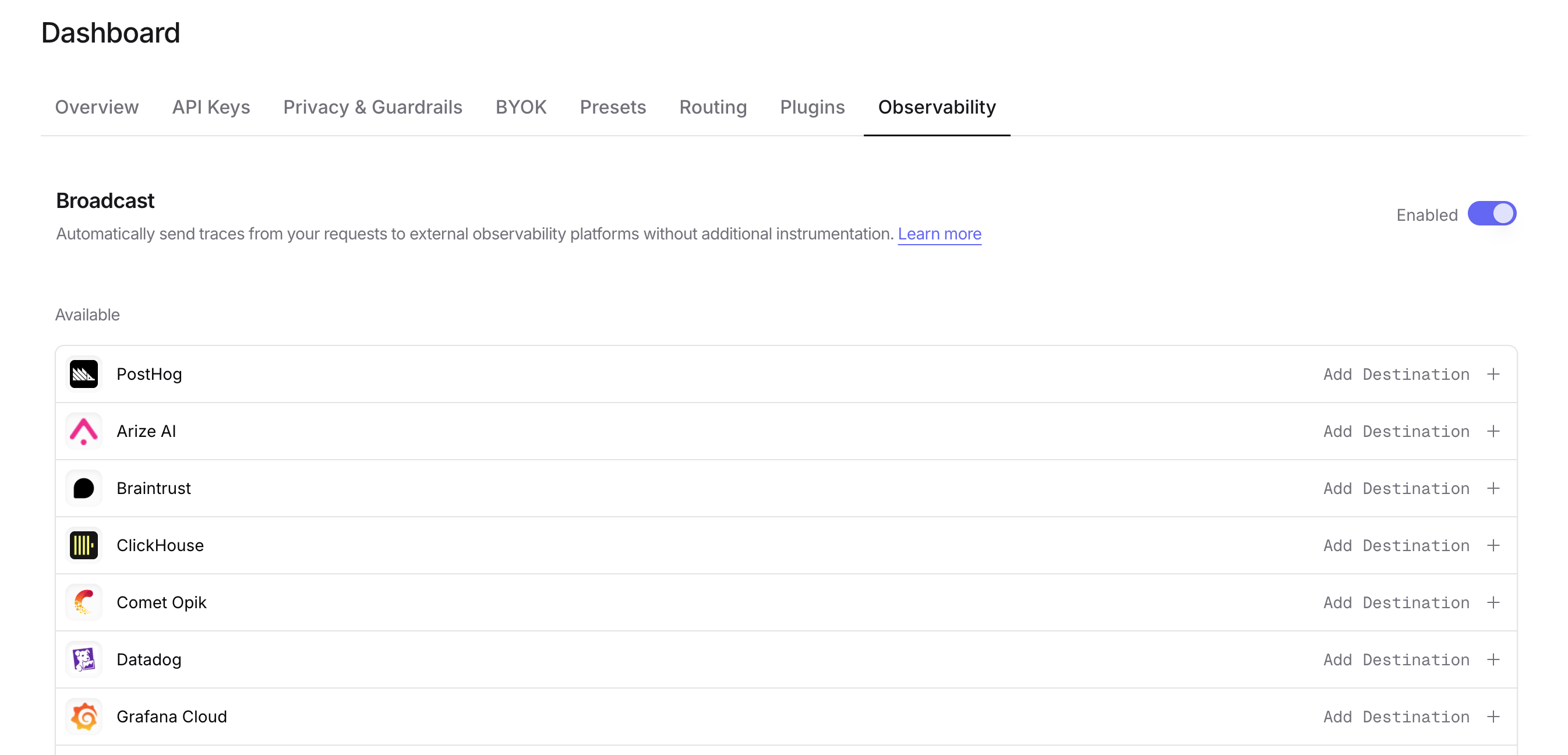
Go to [Settings > Observability](https://openrouter.ai/settings/observability) and toggle **Enable Broadcast**.
 ## Step 3: Configure OpenTelemetry Collector
Click the edit icon next to **OpenTelemetry Collector** and enter:
* **Endpoint**: Your OTLP traces endpoint URL (e.g., `https://api.axiom.co/v1/traces` or `https://your-collector.example.com:4318/v1/traces`)
* **Headers** (optional): Custom HTTP headers as a JSON object for authentication
Example headers for Axiom:
```json lines theme={null}
{
"Authorization": "Bearer xaat-your-token",
"X-Axiom-Dataset": "your-dataset"
}
```
Example headers for authenticated collectors:
```json lines theme={null}
{
"Authorization": "Bearer your-token",
"X-Custom-Header": "value"
}
```
## Step 4: Test and save
Click **Test Connection** to verify the setup. The configuration only saves if the test passes.
## Step 5: Send a test trace
Make an API request through OpenRouter and view the trace in your OpenTelemetry backend.
## Compatible backends
The OpenTelemetry Collector destination works with any backend that supports OTLP over HTTP, including:
* **Axiom** - Cloud-native log and trace management
* **Jaeger** - Distributed tracing platform
* **Grafana Tempo** - High-scale distributed tracing backend
* **Honeycomb** - Observability for distributed systems
* **Lightstep** - Cloud-native observability platform
* **Self-hosted OpenTelemetry Collector** - Route traces to multiple backends
OpenRouter sends traces using the OTLP/HTTP protocol with JSON encoding. Ensure your collector or backend is configured to accept OTLP over HTTP on the `/v1/traces` path.
## Custom Metadata
Custom metadata from the `trace` field is sent as span attributes in the OTLP payload. How this metadata appears depends on your downstream backend.
### Supported Metadata Keys
| Key | OTLP Mapping | Description |
| ----------------- | -------------- | ------------------------------------------------ |
| `trace_id` | Trace ID | Group multiple requests into a single trace |
| `trace_name` | Span Name | Custom name for the root span |
| `span_name` | Span Name | Name for intermediate spans in the hierarchy |
| `generation_name` | Span Name | Name for the LLM generation span |
| `parent_span_id` | Parent Span ID | Link to an existing span in your trace hierarchy |
### Example
```json lines theme={null}
{
"model": "openai/gpt-4o",
"messages": [{ "role": "user", "content": "Hello!" }],
"user": "user_12345",
"session_id": "session_abc",
"trace": {
"trace_id": "app_trace_001",
"trace_name": "Chat Handler",
"generation_name": "Generate Response",
"environment": "staging",
"deployment": "us-east-1"
}
}
```
### Span Attributes
Custom metadata keys are included as span attributes under the `trace.metadata.*` namespace. For example, `environment` from the trace field becomes `trace.metadata.environment` in the OTLP payload.
Standard GenAI semantic conventions (`gen_ai.*`) are used for model, token usage, and cost attributes.
### Additional Context
* The `user` field maps to `user.id` in span attributes
* The `session_id` field maps to `session.id` in span attributes
* Your downstream backend determines how these attributes are indexed, queried, and displayed
* Using `parent_span_id` lets you link OpenRouter traces to your application's existing distributed traces
## Billing quantities
Cache-write details are exported as numeric attributes on the generation span:
| Attribute | Meaning |
| ------------------------------------------ | ----------------------------------------------- |
| `gen_ai.usage.input_tokens.cache_write` | Total cache-write tokens. |
| `gen_ai.usage.input_tokens.cache_write_5m` | Five-minute cache-write tokens, when available. |
| `gen_ai.usage.input_tokens.cache_write_1h` | One-hour cache-write tokens, when available. |
With **Cost** enabled under **Additional generation metadata**, the same quantities and native-tool counters are also queryable under `span.metadata.openrouter_generation.*`. For example:
```json theme={null}
{
"span.metadata.openrouter_generation.cache_write_tokens": 300,
"span.metadata.openrouter_generation.cache_creation.ephemeral_5m_input_tokens": 100,
"span.metadata.openrouter_generation.cache_creation.ephemeral_1h_input_tokens": 200,
"span.metadata.openrouter_generation.native_server_tool_use.web_search_requests": 1,
"span.metadata.openrouter_generation.native_server_tool_use.code_execution_requests": 2,
"span.metadata.openrouter_generation.usage_is_estimated": false
}
```
The example shows attribute values as a flat map; OTLP encodes numbers as `intValue` and the estimate flag as `boolValue`. Root spans also carry generation metadata under `trace.metadata.openrouter_generation.*`. Read each generation once. These representations repeat the same generation quantities; do not add them together. Unavailable quantities are omitted from OTEL attributes, while zero and `false` are preserved. See [Token and cost fields](/docs/guides/features/broadcast#token-and-cost-fields) for interpretation and billing caveats.
## Privacy Mode
When [Privacy Mode](/docs/guides/features/broadcast#privacy-mode) is enabled for this destination, prompt and completion content is excluded from traces. All other trace data — token usage, costs, timing, model information, and custom metadata — is still sent normally. See [Privacy Mode](/docs/guides/features/broadcast#privacy-mode) for details.
## Step 3: Configure OpenTelemetry Collector
Click the edit icon next to **OpenTelemetry Collector** and enter:
* **Endpoint**: Your OTLP traces endpoint URL (e.g., `https://api.axiom.co/v1/traces` or `https://your-collector.example.com:4318/v1/traces`)
* **Headers** (optional): Custom HTTP headers as a JSON object for authentication
Example headers for Axiom:
```json lines theme={null}
{
"Authorization": "Bearer xaat-your-token",
"X-Axiom-Dataset": "your-dataset"
}
```
Example headers for authenticated collectors:
```json lines theme={null}
{
"Authorization": "Bearer your-token",
"X-Custom-Header": "value"
}
```
## Step 4: Test and save
Click **Test Connection** to verify the setup. The configuration only saves if the test passes.
## Step 5: Send a test trace
Make an API request through OpenRouter and view the trace in your OpenTelemetry backend.
## Compatible backends
The OpenTelemetry Collector destination works with any backend that supports OTLP over HTTP, including:
* **Axiom** - Cloud-native log and trace management
* **Jaeger** - Distributed tracing platform
* **Grafana Tempo** - High-scale distributed tracing backend
* **Honeycomb** - Observability for distributed systems
* **Lightstep** - Cloud-native observability platform
* **Self-hosted OpenTelemetry Collector** - Route traces to multiple backends
OpenRouter sends traces using the OTLP/HTTP protocol with JSON encoding. Ensure your collector or backend is configured to accept OTLP over HTTP on the `/v1/traces` path.
## Custom Metadata
Custom metadata from the `trace` field is sent as span attributes in the OTLP payload. How this metadata appears depends on your downstream backend.
### Supported Metadata Keys
| Key | OTLP Mapping | Description |
| ----------------- | -------------- | ------------------------------------------------ |
| `trace_id` | Trace ID | Group multiple requests into a single trace |
| `trace_name` | Span Name | Custom name for the root span |
| `span_name` | Span Name | Name for intermediate spans in the hierarchy |
| `generation_name` | Span Name | Name for the LLM generation span |
| `parent_span_id` | Parent Span ID | Link to an existing span in your trace hierarchy |
### Example
```json lines theme={null}
{
"model": "openai/gpt-4o",
"messages": [{ "role": "user", "content": "Hello!" }],
"user": "user_12345",
"session_id": "session_abc",
"trace": {
"trace_id": "app_trace_001",
"trace_name": "Chat Handler",
"generation_name": "Generate Response",
"environment": "staging",
"deployment": "us-east-1"
}
}
```
### Span Attributes
Custom metadata keys are included as span attributes under the `trace.metadata.*` namespace. For example, `environment` from the trace field becomes `trace.metadata.environment` in the OTLP payload.
Standard GenAI semantic conventions (`gen_ai.*`) are used for model, token usage, and cost attributes.
### Additional Context
* The `user` field maps to `user.id` in span attributes
* The `session_id` field maps to `session.id` in span attributes
* Your downstream backend determines how these attributes are indexed, queried, and displayed
* Using `parent_span_id` lets you link OpenRouter traces to your application's existing distributed traces
## Billing quantities
Cache-write details are exported as numeric attributes on the generation span:
| Attribute | Meaning |
| ------------------------------------------ | ----------------------------------------------- |
| `gen_ai.usage.input_tokens.cache_write` | Total cache-write tokens. |
| `gen_ai.usage.input_tokens.cache_write_5m` | Five-minute cache-write tokens, when available. |
| `gen_ai.usage.input_tokens.cache_write_1h` | One-hour cache-write tokens, when available. |
With **Cost** enabled under **Additional generation metadata**, the same quantities and native-tool counters are also queryable under `span.metadata.openrouter_generation.*`. For example:
```json theme={null}
{
"span.metadata.openrouter_generation.cache_write_tokens": 300,
"span.metadata.openrouter_generation.cache_creation.ephemeral_5m_input_tokens": 100,
"span.metadata.openrouter_generation.cache_creation.ephemeral_1h_input_tokens": 200,
"span.metadata.openrouter_generation.native_server_tool_use.web_search_requests": 1,
"span.metadata.openrouter_generation.native_server_tool_use.code_execution_requests": 2,
"span.metadata.openrouter_generation.usage_is_estimated": false
}
```
The example shows attribute values as a flat map; OTLP encodes numbers as `intValue` and the estimate flag as `boolValue`. Root spans also carry generation metadata under `trace.metadata.openrouter_generation.*`. Read each generation once. These representations repeat the same generation quantities; do not add them together. Unavailable quantities are omitted from OTEL attributes, while zero and `false` are preserved. See [Token and cost fields](/docs/guides/features/broadcast#token-and-cost-fields) for interpretation and billing caveats.
## Privacy Mode
When [Privacy Mode](/docs/guides/features/broadcast#privacy-mode) is enabled for this destination, prompt and completion content is excluded from traces. All other trace data — token usage, costs, timing, model information, and custom metadata — is still sent normally. See [Privacy Mode](/docs/guides/features/broadcast#privacy-mode) for details.